What's Inside a WordPress Block Theme?
A tour of the files in a block theme: which two are required, what theme.json does, and how templates, parts and patterns fit together.

By Steve, Founder and editor, website developer
Updated
· Last reviewed · 2 min read
In short
- A block theme needs only two files: style.css and templates/index.html.
- The only header line WordPress requires in style.css is "Theme Name".
- theme.json holds the theme's global settings and styles: colours, fonts, spacing and layout widths.
- screenshot.png (ideally 1200 × 900 pixels) is the picture shown in Appearance › Themes.
Which files does a block theme need?
WordPress's theme handbook names two required files for a block theme:
style.css, whose header comment gives the theme's name and details.templates/index.html, the default template. It's what makes WordPress treat the theme as a block theme.
Everything else is optional, but almost every real theme also has theme.json, more templates, template parts and a screenshot.
A typical block theme, file by file
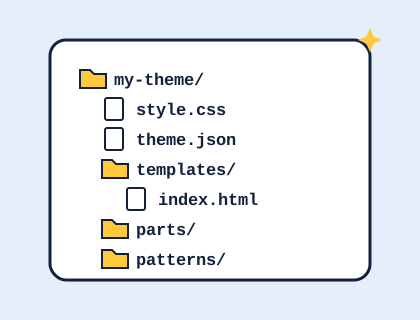
my-theme/
├── style.css          (required: theme name and details)
├── theme.json         (colours, fonts, spacing, layout)
├── functions.php      (optional PHP)
├── screenshot.png     (1200 × 900 preview image)
├── readme.txt
├── templates/
│   ├── index.html     (required: the fallback template)
│   ├── front-page.html
│   ├── page.html
│   ├── single.html
│   ├── archive.html
│   ├── search.html
│   └── 404.html
├── parts/
│   ├── header.html
│   └── footer.html
├── patterns/
│   └── hero.php
└── assets/
    ├── fonts/
    └── images/
What goes in style.css?
The comment at the top of style.css is the theme's ID card. WordPress requires only Theme Name, and shows some of the other details in Appearance › Themes. Themes submitted to the WordPress theme directory must also include Description, Version, Author, Text Domain, Tested up to, Requires at least, Requires PHP, License and License URI. Most styling in a block theme lives in theme.json, so style.css is often short.
What does theme.json do?
theme.json is the theme's global settings and styles file. In plain terms, it says which colours appear in the palette, which fonts are available and at what sizes, how wide content can be, and how elements like headings, links and buttons look. The Styles panel in the Site Editor reads from it, and changes you make there are saved on top of it without editing the file.
What are templates, parts and patterns?
- Templates
- Whole-page layouts in the
templatesfolder, chosen by the WordPress template hierarchy:single.htmlfor posts,page.htmlfor pages,front-page.htmlfor the home page, andindex.htmlwhen nothing more specific exists. - Template parts
- Reusable sections such as the header and footer, in the
partsfolder, included in templates. - Patterns
- Ready-made groups of blocks in the
patternsfolder, which WordPress registers automatically. Patterns can be PHP files, so they can include images that ship with the theme.
Do block themes need functions.php?
No, it's optional. Themes from our builder use a short functions.php to load the stylesheet and, if you added a logo, to put it in your Media Library and set it as the site logo when you activate the theme.
Where to go next
Ready to make one? See how to make your own WordPress theme, or open a theme from our catalogue and look inside.
Sources and further reading
Didn't find your answer?
Ask us anything about WordPress or the theme builder. We answer the most useful questions here, so others can benefit too.